Data structure


Counting the cell or microbial types from a biological sample results in a vector of counts (of dimension p), with each entry representing a cell type. A tascCODA dataset aggregates n such count vectors as the rows of a matrix of dimension nxp, the so-called count matrix Y. The count data does not need to be normalized, as tascCODA works on the integer count data. In addition to the counts, tascCODA also requires covariates that contain information about each sample. These can be indicators for e.g. diseases, or continuous variables, such as age or BMI. The d covariates for a tascCODA dataset are described by the (nxd dimensional) covariate matrix X.
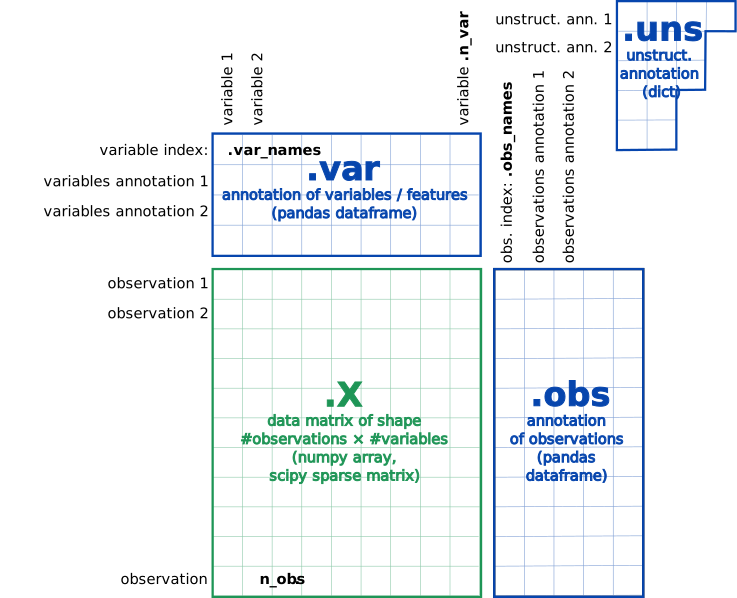
tascCODA uses the anndata format to store compositional datasets.
Hereby, data.X represents the cell count matrix, and data.obs the covariates (The actual covariate or design matrix is generated when calling a model).
data.var is a pandas DataFrame that has the feature names as an index, and data.uns is a dictionary, which needs to include the tree structure
as a a toytree object in data.uns["phylo_tree"].
Data import methods
tascCODA supports the same data structure as scCODA, and thus the data loaders from sccoda.util.cell_composition_data can be used.
It contains methods to import count data from various sources into the data structure used by scCODA and tascCODA.
You can either import data directly from a pandas DataFrame via from_pandas, or get the count data from single-cell expression data used in scanpy.
If all cells from all samples are stored in one anndata object, from_scanpy generates a compositional analysis dataset from this.
If there is one anndata object with the single-cell expression data for each sample,
from_scanpy_list (for in-memory data) and from_scanpy_dir (for data stored on disk) can transform the information from these files directly into a compositional analysis dataset.
For more information, see the scCODA data import and visualization tutorial.
Additionally, tascCODA needs a tree structure, located in data.uns["phylo_tree"] as a toytree object.
The easiest way to create such an object is through a Newick string. If the hierarchical information is only available as a pandas DataFrame,
tasccoda.tree_utils.df2newick provides an easy way to create such a string.
For an example on this, check out the tascCODA tutorial!